Heartopia Frequently Asked Questions
Managing your account and progressing in Heartopia is easy once you know the basics. Here are the answers to the most common questions regarding cross-play, servers, and leveling up.
Q: Can I play on multiple devices?
Yes! Heartopia fully supports cross-platform play. To continue your journey on a different device, simply:
- Log in to your account on any supported platform.
- Select the same server where you originally created your character.
- Your progress will sync automatically, allowing you to pick up right where you left off.
Q: Can I switch servers?
While you can join different servers, there are a few important restrictions to keep in mind:
- Character Binding: Your character is permanently bound to the server where they were created.
- Starting Over: If you switch to a new server, you will need to create a new, separate character.
- Progress Persistence: Your original character is not deleted; they will remain on their original server if you ever wish to go back.
- Social Limits: Note that you cannot interact with or visit players who are on different servers.
Tip: Coordinate with your friends before starting to ensure you all choose the same server from day one!
Q: How do I increase my D.G. Level?
Increasing your D.G. Level is essential for unlocking new content. The primary way to level up is by completing Resident Requests (your daily tasks).
- The Process: Complete these daily requests to earn Medals.
- The Goal: Medals are the specific currency required to upgrade your level.
- Consistency is Key: Since these are “dailies,” checking in every day to finish your requests is the fastest way to progress.
Q: I’m out of quests, what now?
Don’t worry! If you’ve cleared your log, you’ll need to wait for the daily reset for new adventures. In the meantime, it’s the perfect time to:
- Focus on your Hobbies.
- Socialize with NPCs or other players.
- Explore hidden areas of the map.
- Just hang out and chill in your home!
Q: When do dailies and shops reset?
Timing is everything! Keep these schedules in mind:
- Daily Quests: Refresh every day at 6:00 AM server time.
- Weekly Requests: Refresh every Saturday at 6:00 AM server time.
- Pet Shop Breeds: Change daily after the 6:00 AM reset.
Pro Tip: To check your current server time, simply click the time on your watch in-game!
Q: How can I learn Bug Catching, Cooking, or Bird Watching?
To expand your skill set, you will need Hobby Expansion Tickets. You earn these as you increase your Developer Level:
- Level 5: 1 Ticket
- Level 8: 1 Ticket
- Level 11: 1 Ticket
- Level 12+: More hobbies unlock automatically!
Note: You will eventually be able to learn all hobbies, so don’t stress if you can’t decide which one to pick first!
Q: How can I adopt a pet?
- Reach Level 12: You must also have all previous hobbies unlocked.
- Unlock Care Hobbies: This will trigger the Dog and Cat Care hobbies.
- Complete the Quest: Look for Mrs. Joan, who will give you the official adoption quest.
- Visit the Shop: If you don’t see the breed you want, check back the next day after 6:00 AM.
Pet Limits: By leveling up your care hobbies, you can own a maximum of 5 cats and 3 dogs.
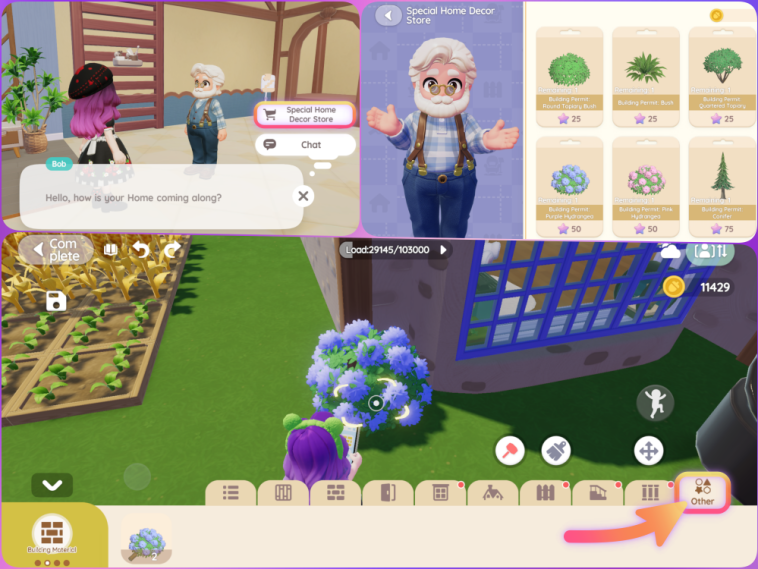
Q: How do I complete the “Verdant Greenery” quest?
This quest can be tricky because decorative potted plants often don’t count. Follow these exact steps to finish it:
- Visit Bob: Head over to Bob’s Furniture Store.
- Open the Special Store: Talk to Bob and select the Special Home Decor Store option.
- Purchase a Plant: Buy any plant you like. These are blueprints, not one-time items!
- Go Home: Enter your building mode.
- Find the Item: Navigate to Building Material > Other. Your new plant blueprint will be there.
- Place & Finish: Place the plant anywhere in your home and exit building mode to complete the quest!
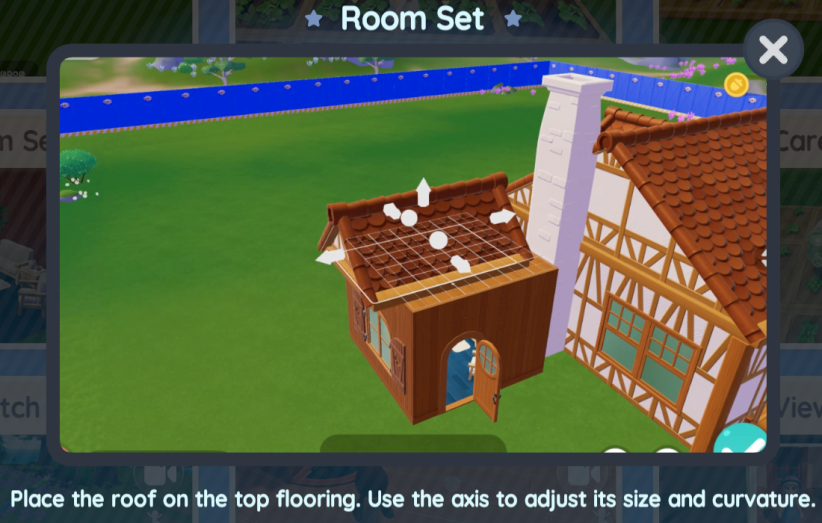
Q: How do I place a roof on my house?
Before you can add a roof, you must complete the structural foundation of your room.
- The Rule: You must build a ceiling using floors first.
- Placement: Once the ceiling/floor is set, you can then place the roof component on top of the structure.
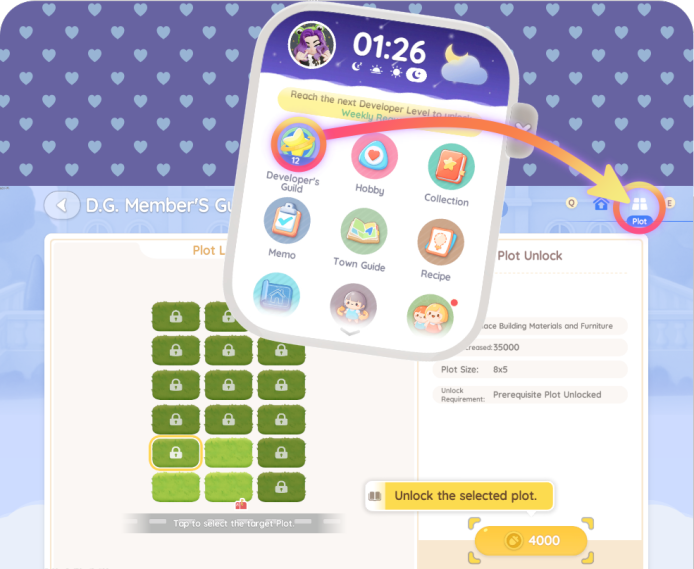
Q: How do I buy more house plots?
Ready to expand your estate? Buying additional land is done through the UI:
- Open your Watch Menu.
- Navigate to the Developer’s Guild section.
- Look for the PC/Monitor icon in the top right corner.
- From there, you can purchase additional land plots to build your dream village.
Q: How do I catch a Flashing Fish Shadow?
The Flashing Fish Shadow is a special quest requirement that requires a bit of strategy.
- The Mechanic: You must use a Fish Attractor. Catch enough fish within the attractor’s zone before the timer runs out to trigger the blue-shadow fish.
- Pro-Tip: This is much easier to do with a group! If you are solo, you’ll need a bit of luck to catch fish quickly.
- Advanced Strategy: Once you reach a higher fishing level, unlock Mermaid Perfume. This allows for instant catches, making it much easier to spawn the shadow fish alone.
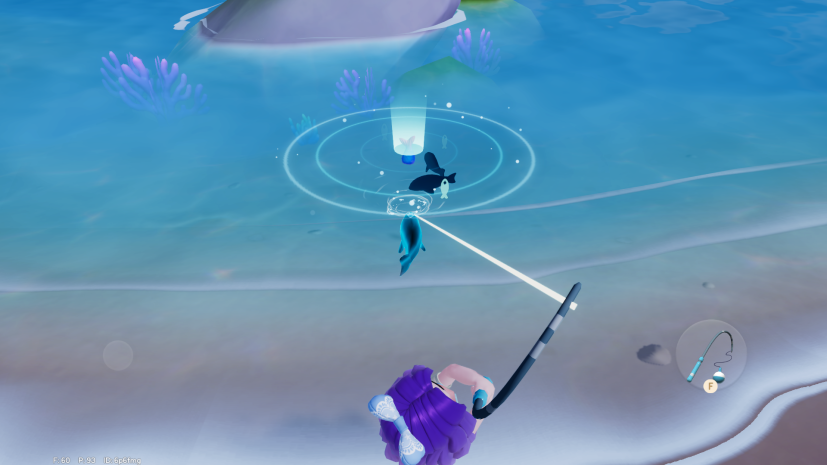

Note: Vanya sells additional Fish Attractors if you run out!
Q: Can I change my character’s appearance?
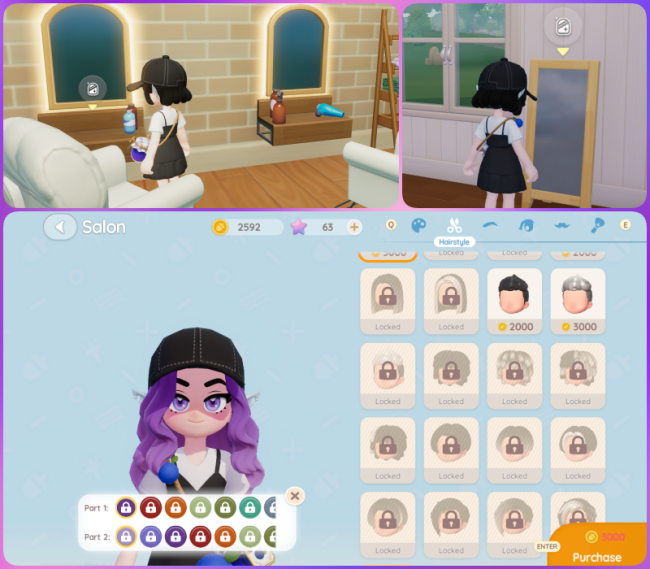
Yes! You aren’t stuck with your initial look. You can change your hairstyle, eye color, facial hair, and more using a Mirror.
Where to find a Mirror:
- At Home: Craft or buy a mirror and place it anywhere in your house.
- In Town: Visit Dorothee’s Clothing Shop and head to the second floor to use the mirrors there.
Unlocking New Styles:
While using the mirrors at Dorothee’s shop, you can purchase premium styles. Once purchased, these options will permanently unlock and be available to use at your home mirrors as well.
Q: Where is the Resident Requests Office?
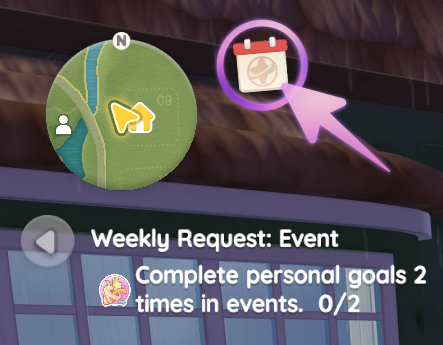
Contrary to its name, the Resident Requests Office isn’t a physical building you can walk into. It is a digital interface where residents post their needs.
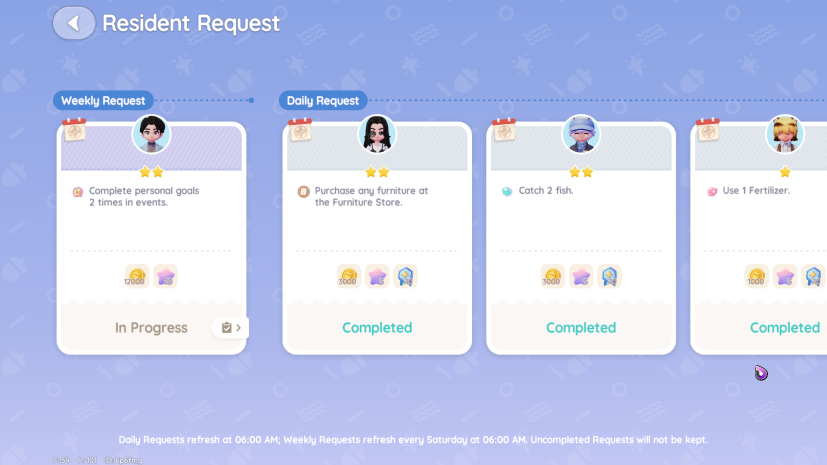
- How to access it: Click on the calendar icon (🗓️) located right next to your mini-map.
- Unlock Requirements: Weekly Requests unlock once you reach D.G. Member Level 13.
- Refresh Time: The board refreshes every Saturday at 6:00 AM (Server Time).
Q: How do I complete Personal Goals in Events?
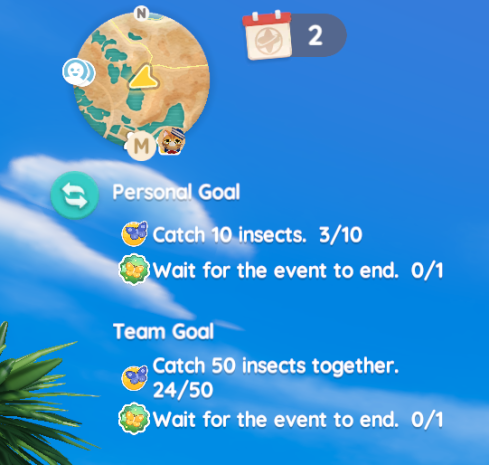
Events like bug catching and fishing often come with specific objectives. These are split into Personal and Team goals.
- Tracking Progress: Check the area directly under your mini-map (where your tracked quests usually appear).
- How to Win: Simply fulfill the requirement listed during the event window. For example, in the Bait The Insects event, you might be tasked with catching 10 insects. Once you hit that number, the goal is marked complete!
Q: How to Play with Friends
Socializing is a huge part of the experience! Here is how to connect with others depending on where they are.
If they are in your Town:
- Direct Approach: Simply run up to their character and interact with them to send a friend request.
- Home Visit: You can visit a player’s home and send a request through their mailbox.
- Cost: Sending a friendship request costs 1 Star (紫), but accepting a request is always free!
If they are NOT in your Town:
- Use the Friendship Notebook: This feature unlocks at Level 4. Ask your friend for their UID and add them directly through the notebook.
- Travel: Once you are friends, you can jump to their Town (if it isn’t full) via the Friendship Notebook.
- Login Shortcut: You can also join a specific Town directly from the login menu if you have the Town ID.
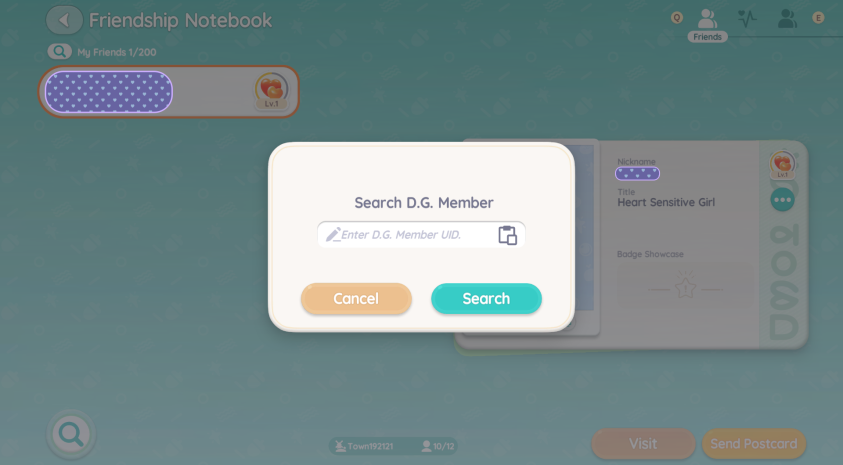
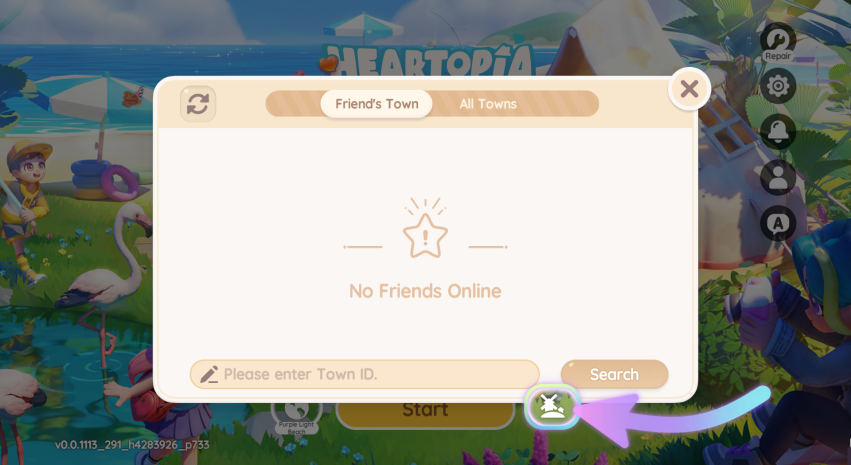
💡 Pro Tip: You can find your UID in Settings or your Player Profile. The Town ID is located in Settings or on your Map.
Is there marriage in Hartopia, or can I marry characters I can’t play as, like Blanc?